As some of you might know, I am a big fan of XBMC Media center : the software of choice for my HTPC (Home Theatre PC), and with good reason: It's attractive, powerful, and highly customizable (check my earlier post where I covered the basics of XBMC).
Yesterday I came across a great skin for XBMC called Convergence. Convergence is a mod of Confluence (the default skin of XBMC) that share the basic core of the Convergence design but mix it up with new features and focus, incorporating a good number of eye candy, tweaks, addons and scripts. Also, its highly customizable: you can easily change transparency, main menu buttons or default actions. Check out the screenshots:


 For complete list of features, check this link
To install Convergence, follow these instructions :
Yesterday I came across a great skin for XBMC called Convergence. Convergence is a mod of Confluence (the default skin of XBMC) that share the basic core of the Convergence design but mix it up with new features and focus, incorporating a good number of eye candy, tweaks, addons and scripts. Also, its highly customizable: you can easily change transparency, main menu buttons or default actions. Check out the screenshots:


To install Convergence, follow these instructions :
2.Click here and download the zip file and save it to a local drive that XBMC has access to.
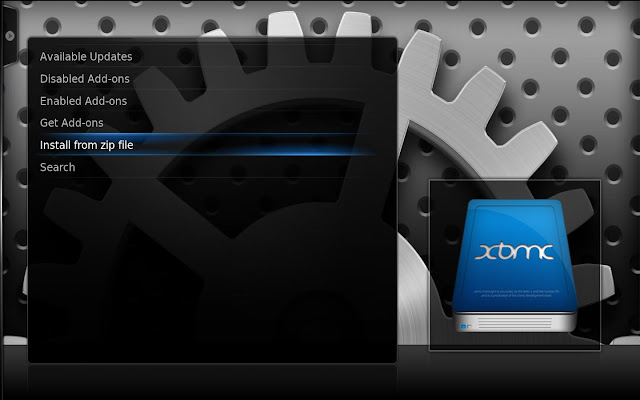
4. Now go to System -> Add-ons -> Get Add-ons -> Mudisle Repo->skin. In that you’ll find an entry for the Convergence itself. Select it and you’ll get an installation box.
5. Click install and wait for the installation to complete. This will take a while.
6. Now go to System -> Appearance -> Skin and select "Convergence"
When you install Convergence you don’t just get a pretty new skin, you get a set of 5 useful plugins too. Pretty neat.
Note that you can repeat the process for any downloaded skin. Remember that each new skin creates a new repository and you’ll need to use that repository to install the skin.


WoW!!
ReplyDeleteThis is PRETTY coooool!!! Thanks for sharing :)
ReplyDeleteMany thanks for this amazing post!
ReplyDeleteHi....
ReplyDeleteOne of the easiest and best ways to completely overhaul your Kodi experience is to ... Confluence was Kodi's default skin from 2009 to 2017.
You are also read more Online Personal Loan in India