Wednesday, January 11, 2012

Guide to Disable all Ad-based Features in Digsby

Digsby is one of the best multiprotocol instant messaging client for Windows that lets you chat with all your friends on AIM, MSN, Yahoo, ICQ, Google Talk, and Jabber with one simple to manage interface.

However, Digsby's greatest nuisance is that it has a number of ad-based features that spam both you and your buddies, and while you can disable them in the preferences, you have to scour it pretty hard to find them all, which is a real pain.

So, in today's post I will show you how you can disable all the ad-based features in Digsby for once and for all.


1. Disable random spam in your social feeds :

  • Go to Tools -> Preference -> General & Profile
  • Uncheck “Show trending news articles in social network feeds”


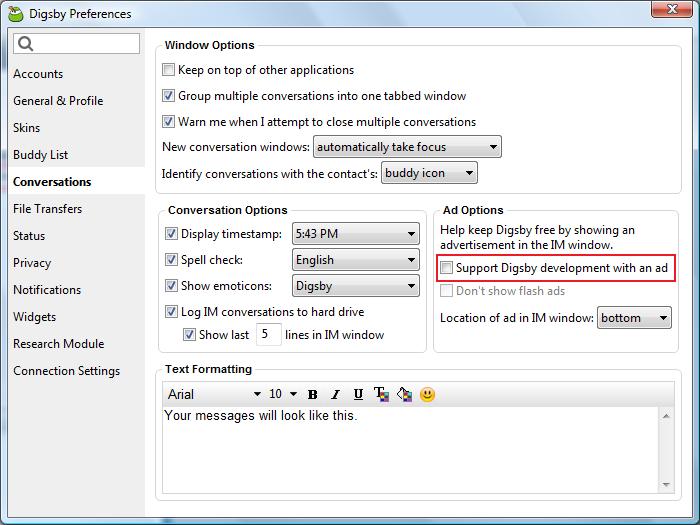
2. Disable flash ads in the IM window :

  • Go to Tools -> Preference -> Conversations
  • Uncheck "Support Digsby developement with an ad"


3. Prevent Digsby from spamming your IM status :

  • Go to Tools -> Preference -> Status
  •  Uncheck "Promote Digsby in my IM status messages"


4. Prevent Digsby from using your computer's processing power when idle :

  • Go to Tools -> Preference ->Research Module
  • Uncheck "Allow Digsby to use CPU time to conduct research after [numeric value] minutes of idle time"


Thats it!

Also Check :

Friday, January 6, 2012

Easter Egg : Hidden Tetris Game in uTorrent

uTorrent (also referred  as μTorrent) is undoubtedly the best and most popular P2P client for Windows. But did you know that there is an Easter egg in uTorrent that allows you to play μTetris, a hidden Tetris game?

Here's how :

1.  Start uTorrent

2. Click "Help" and select "About μTorrent"


3. The About window will appear. Press the letter "t" on your keyboard


4. The hidden Tetris game will appear. Use the arrow keys to control the falling objects. The left and right arrows move the object in that direction, the bottom arrow speeds the object’s fall., while the top arrow rotate the object.


Bonus : In the About window, if you click on the µTorrent logo, you will hear a synthesized sound

Also check :

Thursday, December 29, 2011

How to Use Profile Picture as Facebook Chat Emoticon

Bored of sending the usual emoticons on Facebook chat? Fret not, as now you can use the profile picture of an user, page or any event as an emoticon in the Facebook conversation! Even if you are not friends with a particular person, you can now use his/her profile picture as an emoticon in your Facebook chat.


Here's how :

1. Visit the profile, fan page or event that you want to use as an emoticon.

2. Check the URL in the address bar of your browser. See the username or profile ID at the end of the URL such as “Techmeasy” i.e. http://www.facebook.com/Techmeasy, “britneyspears”, “zuck” (Mark Zuckerberg), or even “100000550591954″


3.Now in the Facebook chat box, place that username or profile id in double brackets like [[Techmeasy]] or [[100000550591954]]

That’s it. Hit Enter and  the text will turn into that person, page, or event’s profile picture. You can even send these emoticons from your mobile device.

To get started, here’s a few Facebook username's that you could use as emoticons :

Unlike
[[unliike]]
Mark Zuckerberg
[[Zuck]]
Pikachu
[[326134990738733]]
Shin chan
[[196431117116365]]
Smiley Face
[[107300705969843]]
Teddy bear
[[113847208655524]]
Packman
[[110183382339001]]
Britney Spears
[[britneyspears]]

[[UPDATE #1]]

High Resolution Facebook Emoticons

Usage : Copy the codes and paste it on your chat box

1.Mask

[[255006724575192]] [[255006727908525]] [[255006737908524]] [[255006734575191]] [[255006731241858]]
[[255006827908515]] [[255006831241848]] [[255006824575182]] [[255006817908516]] [[255006821241849]]
[[255006874575177]] [[255006871241844]] [[255006884575176]] [[255006877908510]] [[255006881241843]]
[[255006934575171]] [[255006931241838]] [[255006941241837]] [[255006944575170]] [[255006937908504]]
[[255007004575164]] [[255007001241831]] [[255006994575165]] [[255006997908498]] [[255006991241832]]
[[255007084575156]] [[255007101241821]] [[255007077908490]] [[255007091241822]] [[255007081241823]]

2. Jack Sparrow

[[298356520217565]] [[298356516884232]] [[298356506884233]] [[298356510217566]]
[[298356513550899]] [[298356620217555]] [[298356606884223]] [[298356616884222]]
[[298356610217556]] [[298356613550889]] [[298356673550883]] [[298356676884216]]
[[298356666884217]] [[298356680217549]] [[298356670217550]] [[298356740217543]]
[[298356733550877]] [[298356743550876]] [[298356730217544]] [[298356736884210]]
[[298356823550868]] [[298356810217536]] [[298356820217535]] [[298356826884201]]
[[298356813550869]] [[298356906884193]] [[298356896884194]] [[298356900217527]]
[[298356903550860]] [[298356893550861]] [[298356950217522]] [[298356946884189]]

3. Superman

[[299528860107644]] [[299528863440977]] [[299528866774310]] [[299528856774311]]
[[299528870107643]] [[299528950107635]] [[299528943440969]] [[299528946774302]]
[[299528953440968]] [[299528956774301]] [[299529013440962]] [[299529016774295]]
[[299529010107629]] [[299529003440963]] [[299529006774296]] [[299529060107624]]
[[299529063440957]] [[299529066774290]] [[299529070107623]] [[299529073440956]]
[[299529173440946]] [[299529183440945]] [[299529180107612]] [[299529176774279]]
[[299529186774278]] [[299529243440939]] [[299529236774273]] [[299529240107606]]

4. Elmo

[[302117289844540]] [[302117283177874]] [[302117276511208]] [[302117279844541]] [[302117286511207]] [[302117366511199]]
[[302117369844532]] [[302117373177865]] [[302117383177864]] [[302117379844531]] [[302117426511193]] [[302117436511192]]
[[302117429844526]] [[302117423177860]] [[302117433177859]] [[302117523177850]] [[302117529844516]] [[302117526511183]]
[[302117536511182]] [[302117533177849]] [[302117606511175]] [[302117596511176]] [[302117599844509]] [[302117593177843]]
[[302117603177842]] [[302117646511171]] [[302117649844504]] [[302117659844503]] [[302117656511170]] [[302117653177837]]
[[302117706511165]] [[302117703177832]] [[302117699844499]] [[302117709844498]] [[302117696511166]] [[302117749844494]]

5. Troll face

[[242538225822042]] [[242538222488709]] [[242538232488708]] [[242538219155376]] [[242538229155375]] [[242538339155364]]
[[242538335822031]] [[242538342488697]] [[242538345822030]] [[242538349155363]] [[242538392488692]] [[242538395822025]]
[[242538399155358]] [[242538402488691]] [[242538405822024]] [[242538475822017]] [[242538472488684]] [[242538489155349]]
[[242538492488682]] [[242538485822016]] [[242538562488675]] [[242538565822008]] [[242538569155341]] [[242538575822007]]
[[242538572488674]] [[242538612488670]] [[
242538625822002]] [[242538619155336]] [[242538622488669]] [[242538615822003]]
[[242538675821997]] [[242538682488663]] [[242538672488664]] [[242538679155330]] [[242538685821996]] [[242538742488657]]

6. Mr. Bean

[[255016264574238]] [[255016271240904]] [[255016277907570]]
[[255016267907571]] [[255016274574237]] [[255016384574226]]
[[255016387907559]] [[255016394574225]] [[255016401240891]]
[[255016391240892]] [[255016464574218]] [[255016454574219]]
[[255016457907552]] [[255016461240885]] [[255016451240886]]
[[255016537907544]] [[255016531240878]] [[255016534574211]]
[[255016541240877]] [[255016527907545]] [[255016634574201]]

[[UPDATE #2]]

Check my new post if you wish to create your own high resolution Facebook chat emoticon .


Also check :

Monday, December 26, 2011

Google Easter Eggs : "Santa" and "Kwanzaa"

Recently we shared two festival inspired Easter eggs found in Google search called "Let it Snow" and "Hanukkah” with you. To amuse us even more, Google has now added 2 new Easter eggs : "Santa" and "Kwanzaa".

[[ NOTE ]]  Festival or season specific Easter Eggs only work at their specific times

Santa :

Type "Santa" in Google search and press Enter.Your search results will appear with Christmas lights below the search box :

Santa Easter Egg

You can also try the word "Christmas" instead of "Santa"

Kwanzaa :

Typing Kwanzaa in Google search bar shows a row consisting of  colorful candles below the Google search bar. Kwanzaa is a festival honoring African-American festival celebrated from 26th December to 1st January each year in United States.

Kwanzaa Easter Egg

Though these new Easter eggs are not as much fun as "Do a Barrel Roll" or "Google Gravity", they are nevertheless amusing.

Also Check

Thursday, December 22, 2011

Software to Detect if an Image has been Altered or Photoshopped

Which one is real ?
User52 : Does anyone know how to tell if an image has been Photoshopped? 

Like User52, ever wondered if a digital image has been altered? Improvements in photo manipulation softwares such as Photoshop and GIMP have made image alteration both easier to commit and harder to detect. 

But now thanks to a small software called JPEGsnoop, anyone can determine if a photo is edited using any photo editing software. Though not foolproof, this free and portable utility for Windows does a great job at detecting if an image is original or it has been altered.

First download JPEGsnoop from here and extract JPEGsnoop.exe anywhere on your computer. Start the software and check “I have read the terms” box and click OK (see screenshot below).


Program's main window will appear, now drag the image to this window and wait for the report to generate. Scroll down to the last paragraph of this report and look for the word "assessment". Here if it says “Image is processed/edited”, then the image is surly been altered by software means. Chances are, directly above that that line you may even find what program was used to edit the image!


(Click to Enlarge)


The only drawback of JPEGsnoop is that it can't predict what portions of the image has been altered and to what extent the modified image is different from the original one. That is, it can tell if an image has been altered from its original but not by how much.

Image Error Level Analyzer is a great online tool, using which, you can perform a quick scan of a JPEG image and analyze which sections might be modified. You can even play with the quality slider to spot anomalies in the error level.


FotoForensics is another online tool that's worth mentioning here. Do check their tutorial page that demonstrates different modification levels with sample photos. 

Mac Users can use the software Photo Sniff ( priced at $1.99 in the Mac App Store) to accomplish the same.

Also Check :

Monday, December 19, 2011

Google Easter Eggs : "Let it Snow" and "Hanukkah”

[[ NOTE ]]  Festival or season specific Easter Eggs only work at their specific times

With one week to go before Christmas,Google has added a seasonal touch to its search engine by bringing two new Easter Eggs : Let it Snow and Hanukkah

"Let it Snow" Easter Egg
Visit Google.com and type Let it snow and you'll be treated with snowflakes falling from the top of your screen.


That's not all, let the snow to fall for a few seconds and then use your mouse cursor to draw in the frosted glass! To start over again, simply click the “defrost” button and you’ll see a clear screen with falling snowflakes.

Frosted Glass


Typing Hanukkah in Google search bar shows a row of stars below the search bar. (Hanukkah, also known as Festival of Lights, is an eight-day Jewish holiday)

Hanukkah Easter Egg


You can also try the words "Chanukah" or "Chanukkah" instead of "Hanukkah"

Thanks to Abhishek Nair for his input.

Also check :

Friday, December 16, 2011

Find Big Mail

If you're running out of space in your Gmail or Google Apps inbox, the quickest fix is deleting the largest attachments you've got in your mail. But, you can't do that from Gmail's web interface.
Here, FindBigMail comes to rescue. It scans your Gmail, labelling the large ones so you can reclaim some space.

Link: https://www.findbigmail.com/

Update : FindBigMail is now available for Google Apps. Search "big mail" in the Google Apps Marketplace to try out.

Note that FindBigMail is free for Gmail accounts and a trial of one week / 5 scan for any domain version for Google Apps domains is available.

Also check :