Thursday, February 23, 2012

Download PDFZilla Worth $49.95 Absolutely FREE

PDF is an extremely popular document format, but it come with the caveat that you can't edit PDF documents without an expensive program like Adobe Acrobat Writer. If you find that this is a major drawback, you can convert them to other editable formats with PDFZilla.

PDFZilla is a simple program which help users to quickly convert PDF files into editable MS Word Documents, Rich Text Documents, Plain Text Files, Images, HTML Files, and Shockwave Flash SWF Files. The program has a very simple and nice-looking interface that will take a moment or two to get used to.

Formats supported by PDFZilla : DOC, RTF, TXT, BMP, JPG, GIF, PNG, TIF, HTML, SWF

Generally the software costs $49.95 but you can grab it for free right now using the following link :

Download PDFZilla Absolutely FREE (Offer Expired)

Once installed, right-click on its icon and select "Run as Administrator" option to launch it. Once installed, use the free registration code given at the above link to activate your copy.

PDFZilla is for Windows only.

10 Clever Uses of Wolfram Alpha

Wolfram Alpha, the "computational knowledge engine" is an online service that provides answers to your queries not by searching the web, but by doing dynamic computations based on a vast collection of built-in data, algorithms, and methods. Ask it any question or phrase, from the Southwest vs American Airlines to the population Madrid, and you’ll get an answer.

Unlike Google, which searches the entire web for the keywords contained within a search query and then returns thousands of web pages, what Wolfram Alpha intends to do is answer complex search queries by returning a single result. Don’t expect it to replace Google, but rather, let it become a part of your research companion.

Let’s take a look at 10 clever uses of the Wolfram Alpha search engine :

1. Generate Strong Passwords

If you don't use a password generating application, you can turn to Wolfram Alpha to generate unique, random passwords. Simply enter a natural-language query like password of 8 characters into the search box to get your password.


In addition to the random password, Wolfram Alpha offers a phonetic help to make it easier for you to memorize that complex string. It also shows the time it would take for a computer to break that particular password.

2. Open Files with Unknown File-Types (Extensions)

If you come upon a file that have an unknown extension, you can use Wolfram Alpha to determine the associated application that is required to open the file.

Just head to Wolfram Alpha, type the file extension you're looking for with a dot preceding it (e.g: .txt), and hit enter. It'll show you what type of file it corresponds to, as well as give you some supporting applications that you can use to open it


3. Find Scrabble Words

Wolfram Alpha can take a jumbled set of letters and suggest you different words that you can create from those letters, including how many points they'd be worth.

Simply, search Scrabble, click on “a computation” and then enter the jumbled letters (include any spaces for blank tiles) in the input box.


4. Body Mass Index (BMI)

Are you overweight or underweight as judged by body mass index? Wolfram Alpha does this math for you as well. Type Body Mass Index into the search box, enter your weight and height and get the answer straight away. You’ll even get a chart showing you how healthy your body mass index is, as well as a comparison to the national average of United States.


5. Too Drunk to Drive?

Wondering if you’re too drunk to drive? Use Wolfram Alpha to find out. Just type am I drunk into the search field and press enter. Enter the number of drinks you have had, gender, how long you’ve been drinking, and your body weight to find out your current blood alcohol content and the legal limit for driving


6. Movie Information

Query any movie in Wolfram Alpha and it will show you basic information as well as cover art, box office performance, brief cast listing and awards.


7. Find What Flight is Flying Overhead

Wolfram Alpha has the ability to tell you what airplanes are cruising above you based on your position and its knowledge of where various airline and charter flights are located at any point in time. Simply search flight overhead


8. Weather Reporter

To see the weather for many worldwide cities, type weather followed by the city and state or city and country. 


9. Blood Relation

Wolfram Alpha has a Genealogy engine that can trace your family relationships. To make it easier, you also get a tree diagram.


10. Solve Crossword Puzzles

While Wolfram Alpha may not be able to do much in guessing the words from the clues, it sure can help when you know some of the letters in a word. Just type in the known letters and fill in the unknown letters with underscores. (e.g. an_g_a_)


Related Posts :

Tuesday, January 31, 2012

Plot Batman Logo in Google Search and Wolfram Alpha

While researching for the article "Use Google Search to Plot Heart Shaped Graphs", I came to know an interesting equation called the "Batman Curve" (sometimes referred as "Batman Equation" or "Batman Function"). According to Wolfram MathWorld, "The Batman Curve is a piecewise curve in the shape of the logo of the Batman superhero originally posted on reddit.com on Jul. 28, 2011"

The Batman Curve

If you want to check this amazing function yourself or wish to know more about it, go to www.wolframalpha.com, type batman curve and press [enter] :


Batman Curve in Wolfram Alpha
Last year when Google added graphing functionality on Google Search, many people asked, "Is it possible to plot Batman Equation in Google Search too?". Many pundits argued that it is not as the graphing tool is not advanced enough to handle such a heavy duty equation.

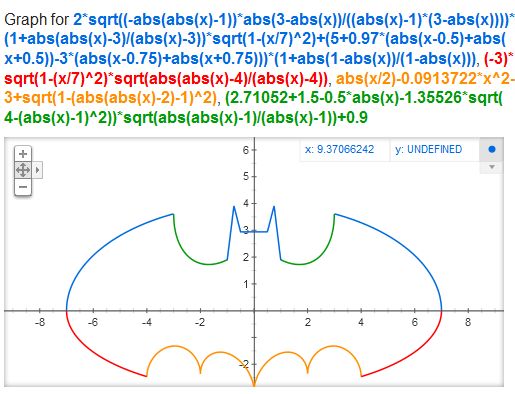
Bad news for the pundits and good news for the rest of us : A guy named Roland Mieslinger has been able to figure out how to plot this seemingly impossible equation in Google Search.

Type the following functions in Google Search bar :

2 sqrt(-abs(abs(x)-1)*abs(3-abs(x))/((abs(x)-1)*(3-abs(x))))(1+abs(abs(x)-3)/(abs(x)-3))sqrt(1-(x/7)^2)+(5+0.97(abs(x-.5)+abs(x+.5))-3(abs(x-.75)+abs(x+.75)))(1+abs(1-abs(x))/(1-abs(x))),-3sqrt(1-(x/7)^2)sqrt(abs(abs(x)-4)/(abs(x)-4)),abs(x/2)-0.0913722(x^2)-3+sqrt(1-(abs(abs(x)-2)-1)^2),(2.71052+(1.5-.5abs(x))-1.35526sqrt(4-(abs(x)-1)^2))sqrt(abs(abs(x)-1)/(abs(x)-1))+0.9

Batman Logo in Google Search

Have fun sharing this trick with your friends :)

Also check :

Wednesday, January 25, 2012

Integrate Results from Facebook and Twitter in Google Search

Google has recently added a new feature to its search engine dubbed as "Search Plus Your World" that not only finds content from public web but also integrates results from Google+, its own social networking platform.


The primary downside of this new feature is that it integrates results from Google+ ONLY and not from other, more popular social networking sites like Facebook, Twitter, Tumbler etc.

To counter this, you can use "Don't be Evil" : a bookmarklet released by a group of engineers from Facebook, Twitter, and MySpace. The bookmarklet is actually a small javascript that runs in your browser and adds results from other social sites to Google's "Search Plus Your World" feature.


To install it, go to Focus on the User website, click "Try a More Relevant Google", and drag the button "don't be evil" to your browser's bookmark toolbar. The next time you perform a search that shows social results, click on the "don't be evil" bookmarklet for improved results.


Also Check :


Monday, January 23, 2012

Solution : Facebook Authentication Problem in Digsby

For those of you who use Digsby, you may have noticed that both Facebook chat and Facebook notifications fail to authenticate and disconnect quite often. What I'm about to tell you isn't a fix for the actual Facebook chat implementation in Digsby, but it does fix Facebook Chat by letting you access it via the Jabber protocol

Here's the trick :

1) Start Digsby

2) Click on the "Digsby" menu (on the top left of the buddy list)

3) Select "My Accounts"

4) In the "My Accounts" section, click on the icon that looks like a brown light bulb [check the screenshot]


5) Enter the following information :

  • Jabber ID : username@chat.facebook.com

    The "username" is the name in your Facebook address. For example. If your Facebook profile address is www.facebook.com/techmeasy, then type techmeasy@chat.facebook.com in "Jabber ID" field.
    ..
    If you don't already have a username for your Facebook account you can obtain one from the following address. https://www.facebook.com/username/
    ..
  • Password : <your facebook password>

    6) click the Save button.

    That's it. Your Facebook friends should now be showing in Digsby. Also go back to your Digsby "My Account" box, click on the Facebook icon and uncheck the "chat" label to prevent your Facebook friends to show up twice in your buddy list.

    Also Check :

    Tuesday, January 17, 2012

    Open any Folder in Explorer from Command Prompt

    Suppose you have navigated deep into a complex folder structure using command prompt, like this for example

    C:\Users\XXZ\My files\Project\Mega Project\Code\ver 2_2\test24

    and realized that it would be a lot easier if I could just use the mouse for this task. Then, what would you do?

    Well, you can use the command "start" to open a folder in explorer from the DOS command prompt.

    Here's how :

    To open the current folder in Explorer, type the following in the command prompt and press [Enter] :

    start .


    You’ll immediately see an Explorer window to your current folder in your command prompt. Do notice the space and dot after the command.

    To open a directory of your choice from command prompt,  type :

    start <path of the directory>

    For example :

    start C:\ProgramData


    If you want Windows Explorer to open the parent folder of the current location, just type :

    start ..


    Friday, January 13, 2012

    Play "Cut the Rope" Game for FREE in Your Web Browser

    Cut the Rope is an award-winning, physics-based puzzle video game initially developed for Apple's iPhone and Google Android phones where the objective of each level is to maneuver a piece of candy into the mouth of a hungry “Om Nom” monster.


    Now Microsoft's Internet Explorer team along with the developers of Cut the Rope has ported this addictive mobile game to PC.

    Simply, fire up your favorite web browser to play this awesome game for free!

    Play "Cut The Rope" Game in Your Web Browser

    Although the Cut The Rope site recommends Internet Explorer, the game can be played in any other web browser like Mozilla Firefox, Google Chrome or Opera

    You can play the first 25 levels for free and, if you pin the game to your Windows 7 task bar while playing in Internet Explorer it will unlock 7 additional levels.

    Cut The Rope is available for $0.99 on both the iOS and Android platforms.

    Also Check :